Tips_tutorials > Studiojs201 > Introduction
Introduction
Welcome to the tutorial. (JS stands for JavaScript)
The tutorial is the first in a series of tutorials which take you step by step through writing an Omnis Studio ultra-thin web application. An ultra-thin web application does not use the Omnis Web Client plug-in. Users can interact with your Omnis Studio application using , , or ... no plug-ins required! Functionality on the client side is provided using JavaScript. Page decoration (fonts, colors, borders, etc.) control on the client side is provided by CSS (Cascading Style Sheets).
Overview
There are several components to the ultra-thin client application you will be building in this tutorial.
- The Omnis Studio library which contains the remote task classes.
- Omnis Web App Server is the instance of Omnis Studio listening for messages from the CGI or Script. If it receives a request it instantiates the specified remote task and sends it a $construct message with the HTTP request parameters in a row variable.
- The web server which receives standard HTTP requests. Port 80 is the default port for HTTP requests.
- The CGI or Script which handles communication between the web browser and the Omnis Web App Server.
- The user's web browser which displays web pages sent to it from the web server.
- JavaScript which adds functionality to the web page and sends requests to the web server CGI or script.
The following communication takes place in the demo we will be building.
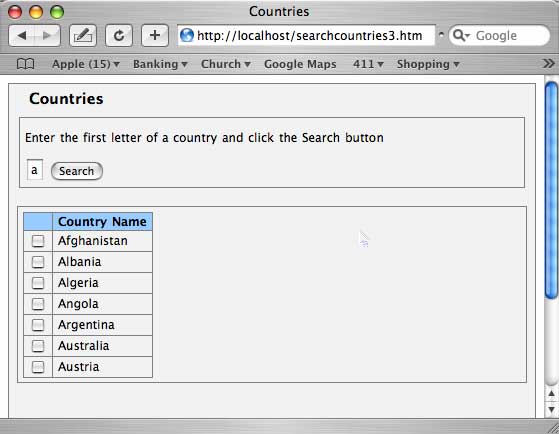
- Using a web browser the user requests a static web page from the web server, searchcountries.htm
- The webserver responds with the HTML which the web browser displays to the user.
- The user fills in a search value and clicks the button on the web page.
- The button calls a JavaScript function which checks to make sure a search value has been entered, and then sends the request to the web server CGI or script.
- The request is processed and forwarded to the Omnis Web App Server which instantiates the specified remote task in the specified library and sends a $construct message with the HTTP parameters in a row variable.
- The remote task processes the request building the HTML for a new page with the search results. The HMTL page is returned to the Omnis Web App Server which passes it back to the CGI or Script which passes it back to the web browser.
- The web browser displays the HTML to the user.
Here is the finished product of what we are going to build in this tutorial.